
Age verification on the website is very important when your website is about cannabis dispensary websites, alcohol-related websites, tobacco or vape stores, adult content websites, mature video games or gambling sites, certain pharmaceutical or supplement sites, and websites bound by legal age-restriction requirements.
You can easily add it to your WordPress website without any plugin. This is a very simple way to do it. For this kind of simple feature, we should not use any extra plugin. I will give you a simple code that you just need to add to your website. And then it’s done.
Step-by-Step Instructions:
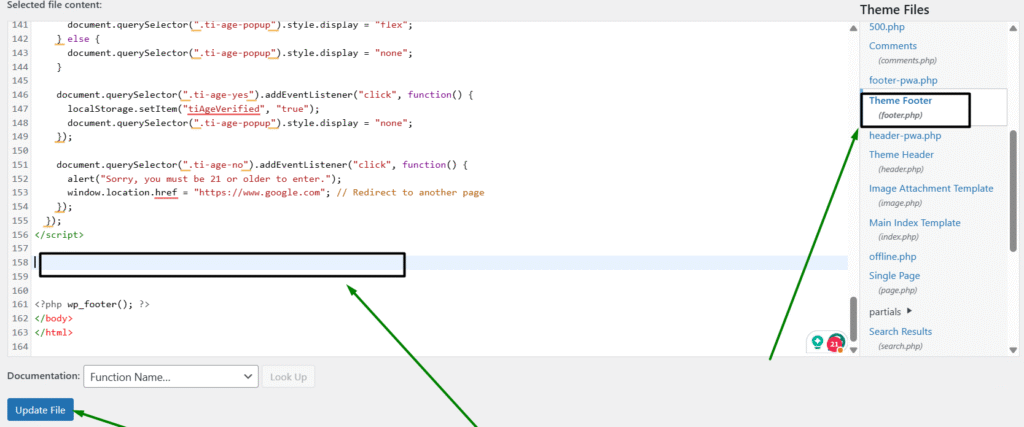
First, login to your WordPress dashboard and go to:
Appearance → Theme File Editor → footer.php
Add the code below to your footer.php file and then just update it. Done.
Now you will see on your website an age verification popup, and if someone’s age is below the restricted age, they will automatically be redirected away from the website.
You can also change the style, layout, font, text, etc.
If you look at the code, the coding style is very simple, so you can easily understand where to change the text and where to change the design.
<!-- Age Restriction Popup -->
<div class="ti-age-popup">
  <div class="ti-age-popup-content">
    <h2>Are you 21 or older?</h2>
    <p>You must be at least 21 years old to enter this site.</p>
    <button class="ti-age-yes">Yes, I am 21+</button>
    <button class="ti-age-no">No, I am under 21</button>
  </div>
</div>

<style>
  .ti-age-popup {
    position: fixed;
    top: 0;
    left: 0;
    width: 100%;
    height: 100%;
    background: rgba(0,0,0,0.85);
    display: flex;
    justify-content: center;
    align-items: center;
    z-index: 99999;
  }

  .ti-age-popup-content {
    background: #fff;
    padding: 30px;
    text-align: center;
    border-radius: 8px;
    max-width: 400px;
    width: 90%;
    box-shadow: 0 0 10px rgba(0,0,0,0.3);
  }

  .ti-age-popup-content h2 {
    margin-bottom: 15px;
  }

  .ti-age-popup-content button {
    padding: 10px 20px;
    margin: 10px;
    border: none;
    background-color: #2e7d32;
    color: white;
    cursor: pointer;
    border-radius: 5px;
  }

  .ti-age-no {
    background-color: #c62828;
  }
</style>

<script>
  document.addEventListener("DOMContentLoaded", function() {
    if (localStorage.getItem("tiAgeVerified") !== "true") {
      document.querySelector(".ti-age-popup").style.display = "flex";
    } else {
      document.querySelector(".ti-age-popup").style.display = "none";
    }

    document.querySelector(".ti-age-yes").addEventListener("click", function() {
      localStorage.setItem("tiAgeVerified", "true");
      document.querySelector(".ti-age-popup").style.display = "none";
    });

    document.querySelector(".ti-age-no").addEventListener("click", function() {
      alert("Sorry, you must be 21 or older to enter.");
      window.location.href = "https://www.google.com"; // Redirect to another page
    });
  });
</script>